I believe everyone has heard about Google's new helpful content update. I hope readers of Digital Engine will not be surprised by the launch of this algorithm! In addition, the content of this issue includes several recent GSC updates, new features of Screaming Frog and a simplified version of the free cloud crawling tool, as well as the author's favorite eighth point GPT-3 teaching text.
- [News] New algorithm change "Helpful Content Update"
- [Official] GSC report update classification method
- [Official] "CWV Report" update in Webmaster Tools
- [Tools] Screaming Frog v17 update
- [Tool] Free cloud website crawling tool
- [Course] Official GA4 Course & Certificate
- [News] GSC’s “Specify International Targets” function will be deprecated
- [Teaching] Using GPT-3 to generate AI content on Google Sheets
- [Video] Google "Search Beginner Tutorial" video Chinese version
- [Abstract] Discussing the accessibility of websites (web accessibility)
[News] New algorithm change "Helpful Content Update"
In August 2022, Google announced and launched a new algorithm change called Helpful Content Update. The announcement gives two guidelines that content creators should follow - (1.) Create content for "people" to see, (2.) Avoid writing content for search engines.
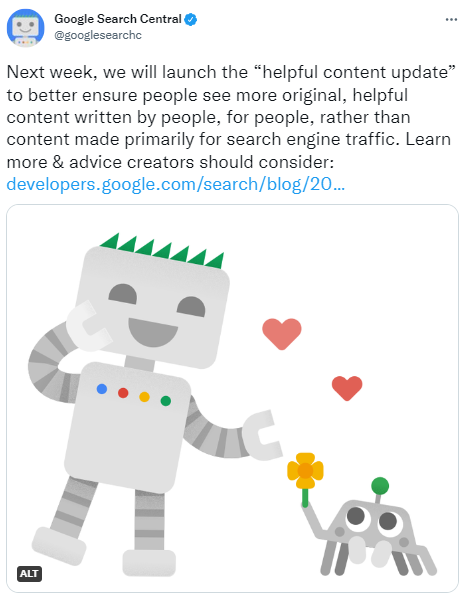
This update began rolling out on 8/25 and is expected to be completed within two weeks. In addition, it will only affect English and general searches (Discover is not included yet). Google will launch such an algorithm update that specifically focuses on whether content is "helpful". It must be in response to the trend of AI-produced content and the large number of mediocre articles that appear in the SEO circle because "content is king". If you don't know the reason for this, please refer to it.Information gain introduced in Issue 59。
SEO expert Aleyda Solis shared a Google Sheet, which contains 25 questions that can be used to check whether the content is helpful, and is recommended for everyone's reference.

link:SEL report/ Expert compilation & analysis (Glen / Wil / Joe)
[Official] GSC report update classification method
There was a change to the Google Search Console interface a while ago, aiming to allow users to find problems more clearly and quickly. This update will not affect Google's indexing methods or search results.
The main reason why Google made this change is that in the old interface, URLs were marked with a "warning" status in addition to "valid" and "invalid", and many users were confused about the impact of the "warning status" of web pages. (ex: Is a URL marked "warning" included?)

The new version of the report only dichotomizes URLs or detection items. In the structured data report, it is "valid vs. invalid"; in the index report, it is "included vs. not included"; and items that were originally warnings will be classified under the most appropriate binary classification.
For example,URL blocked by robots.txt but still included, which was classified as "warning" in the past, is classified as "included" in the new interface. After all, the webpage is indeed included, but there are some problems.
link:official announcement / New classification description Analysis of / Gene Hong (Chinese)
[Official] "CWV Report" update in Webmaster Tools
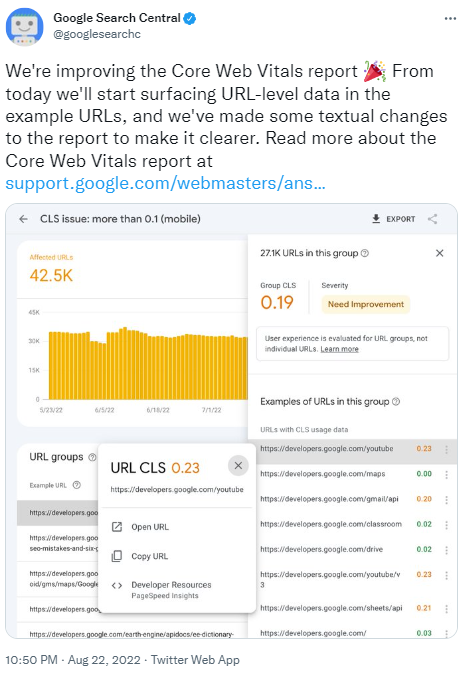
Another GSC interface change occurs in the web page experience report (CWVs Report). You can now see URL-level data in this report. Google will classify URLs with similar problems (usually indicating that these URLs use the same template), and you can see the CrUX score of individual URLs in the three indicators of CWVs.
If you are not familiar with what CrUX is and the source of information, please refer to it Contents ofIssue 61。
link:CWV report document
[Tools] Screaming Frog v17 update
Screaming Frog is undoubtedly my favorite SEO health diagnosis tool! Recently they launched a major revision (v17), which has many very practical new functions, including many very practical functions.
1. The new "Issues" report will organize the crawled data into various correctable suggestions. In addition, you can also compare the results captured in two different time periods with each other to directly see whether the problem has improved or worsened.

2. The new "limit by URL path" can set the maximum number of URLs to crawl for each subfolder. It can save a lot of time and resources, and is especially useful when dealing with large websites, because URLs in the same subfolder usually have similar problems.

3. Divisible windows are a major upgrade in UX. The original interface was not easy to analyze, but now you can split, drag and compare two different screens, which is very practical.

[Tool] Free cloud website crawling tool
SEOnaut is an open source free cloud crawling tool that can be regarded as a weakened version of screaming frog. The usage is the same. After entering a domain, simply set the crawling specifications, and the platform will crawl the entire website and present the results in charts. It will also of course sort out the problems found.
also automatically records each crawled data in the cloud and compares it one by one. It is quite suitable for small and medium-sized companies with limited budgets to monitor the health of the website.


link:Tools / ToolsGitHub
[Course] Official GA4 Course & Certificate
Google officially launched the GA4 training course + certificate on its Skillshop platform. You can pass by answering 50 questions within 75 minutes and reaching 80%. As always, if you fail, you can try again the next day.
Skillshopis Google's training platform, where you can learn Google's tools and platforms and obtain relevant certificates. List of courses on

link:About Skillshop / GA4 trial demo account
[News] GSC’s “Specify International Targets” function will be deprecated
There was one in the old version of Google Search Consoleinternational targeting (specified international target)function can tell Google which country your website is targeted at. But recently, Google announcedThis feature will be deprecated on 9/22.

For multi-country and multi-language websites, Hreflang has always been the best practice. The original international targeting has a very limited use, so it is not surprising that it was abandoned.
However, this also means that the hreflang issues that were originally reported in the international targeting interface will disappear. Webmasters no longer have official data to understand whether the hreflang settings are correct.

link:Google’s documents on multi-country and multi-language websites
[Teaching] Using GPT-3 to generate AI content on Google Sheets
Digital Engine has written many GPT-3 tools in the past, such as "MullerBot that simulates the way John answers questions」、「Automatically generate titles and descriptions」、「Use AI to help write Regex syntax"...Wait. This tutorial directly uses a video to show you how to use GPT-3 and Google Sheets to make your own tools.

Many people may resist AI or coding when they see it, thinking that they cannot learn it. However, the four videos in this article are step-by-step and are free. It is highly recommended that you try them out once to have a better understanding of the development of AI content technology, and to have a better understanding of Google’s recent helpful content updates.
link:GPT-3 teaching text / OpenAI official website
[Video] Google "Search Beginner Tutorial" video Chinese version
Google has translated the series of YouTube videos "Search for Beginners" into Traditional Chinese. The original English version had 14 videos, but only five were available in Chinese until the deadline, but I believe there will be more.

Not sure why Chinese needs its own playlist instead of providing Chinese subtitles in the original video, but more official Chinese resources are always good!
link:Chinese playlist / English playlist
[Abstract] Discussing the accessibility of websites (web accessibility)
This episode interviews Danny to talk about Web Accessibility. He is a UX Interaction Designer at Google and has recently joined the Central Accessibility Team within Google. The first part of the podcast was spent talking about Danny's career at Google and how he came into contact with the field of accessibility.
"Accessibility" is not limited to the field of websites, nor is it necessarily only for people with visual impairments. It has many overlaps with the field of UX, including the contrast of font colors, how to make text easier to absorb or skim... and so on.
The tab key is a commonly used method to determine the accessibility of a website. Ideally, an accessible web page should intuitively jump to the next paragraph when the user presses the tab key. In addition, in order to avoid the situation where the menu is too complicated and requires several tabs to see the main content, a common practice is to put a "skip links menu" option on the first tab to help users browse.

In addition, if you want to evaluate the accessibility of a website, the best way is to use screen readers to browse the website. Recommended tools include Chromechromevox plug-in, built-in in Android phonetalkbackor iOS mobile phoneVoiceOver
link:verbatim draft
Recently I often go to the gym to vent my anger and stress at work. I hope I can become a muscular person when I leave my job.