The first and last items in this episode are closely related to Google Shopping. Friends who run e-commerce websites recommend reading them carefully. There is also some conceptual information, such as the official Q&A of Core Web Vitals that also clarifies some common questions or mistakes. If you are eager to learn more about SEO during the Qingming Festival, you are welcome to read more than 50 BrightonSEO conference briefings. I wish you all a happy holiday season!
- Google launches Best Things for Everything website
- What should I do if the website server is temporarily broken?
- YouTube adds "living room viewing" and "new and old visitors" data
- GMB launches "Comment Removal Request" management tool
- Tutorial: Download the data of "GSC Coverage" at one time
- Google Discovery and News systems are not exactly the same
- [Template] Automatically record web pages in Google Sheets Core Web Vitals
- BrightonSEO Spring briefing summary
- Google Update Core Web Vitals Official Q&A
- Official Video: Search and Discover Video SEO Best Practices
- Official Video: How to Make Your Products Appear in Google Search
Google launches Best Things for Everything website
Presented by Google"Best Things for Everything Guide", collected various information on the Internet and analyzed the search volume, and sorted out the most recommended products in each category, for example: "The best printer」、「 The best guitar」、「 The best backpack"...Wait.
This will undoubtedly have a big impact on affiliate marketing or industry matching articles, and the products placed on it will undoubtedly increase significantly!

link:official announcement / Best Things for Everything website
What should I do if the website server is temporarily broken?
If the website server hangs up for some reason (traffic overload, server failure, attack...), apart from the engineers jumping around, how should SEOs deal with such a situation? John Muller gave quite complete advice on such a situation on Twitter.
Twitter/X Post
View original post on Twitter/X
The original thread has more suggestions, but the more important ones include:
- Ask the server to return a 503 code (Service Unavailable). Do not use 200 or 404. If the entire host hangs up and there is no response at all, you can point the DNS to other hosts and return 503.
- Select a few of the most important pages and make static HTML versions, upload and use the same URL, so that users can still see important information. (Bonus: You can find the page at https://archive.org/ and save it.)
- can design a beautiful-looking 503 page and put appropriate messages. Usually the default error screen of the server is very positive.
link:Anticipatory website maintenance SEO practices
YouTube adds "living room viewing" and "new and old visitors" data
YouTube will add two very practical data to help with analysis.
- Living room impressions: Indicates the number of views whose source is a TV or game console
- New and Returning Viewers: Allows administrators to see how many users have returned to the same channel

link:SEL Report / Youtube returning viewers
GMB launches "Comment Removal Request" management tool
Google merchants have launched a very practical tool that allows merchants to manage comments, report comments, and see the review status of each comment deletion request.
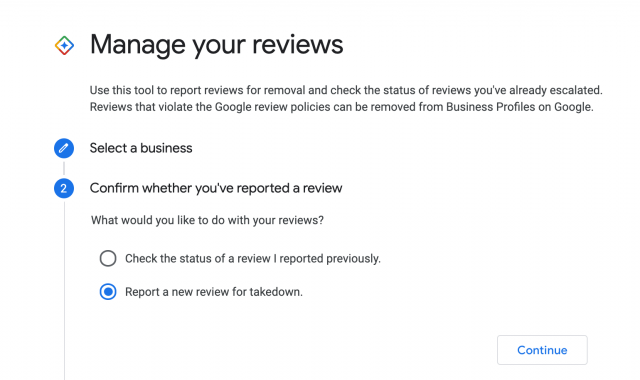
Report comments or check report status 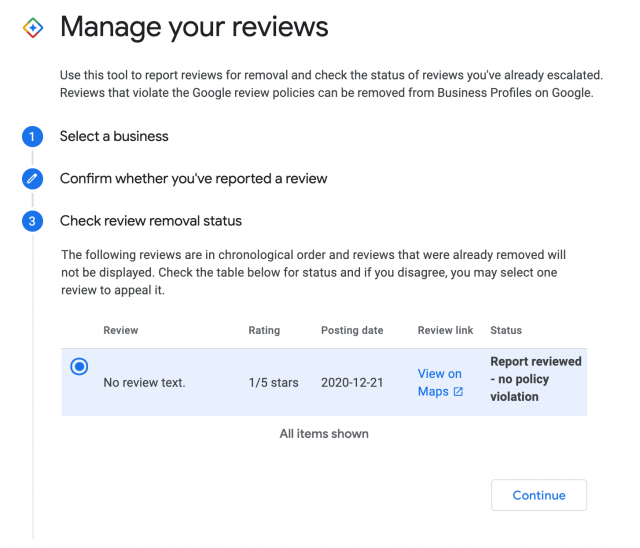
Check report status 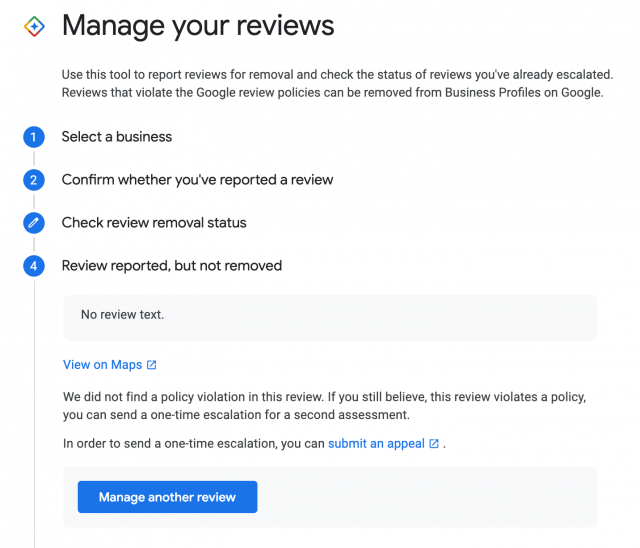
Report results with appeal options 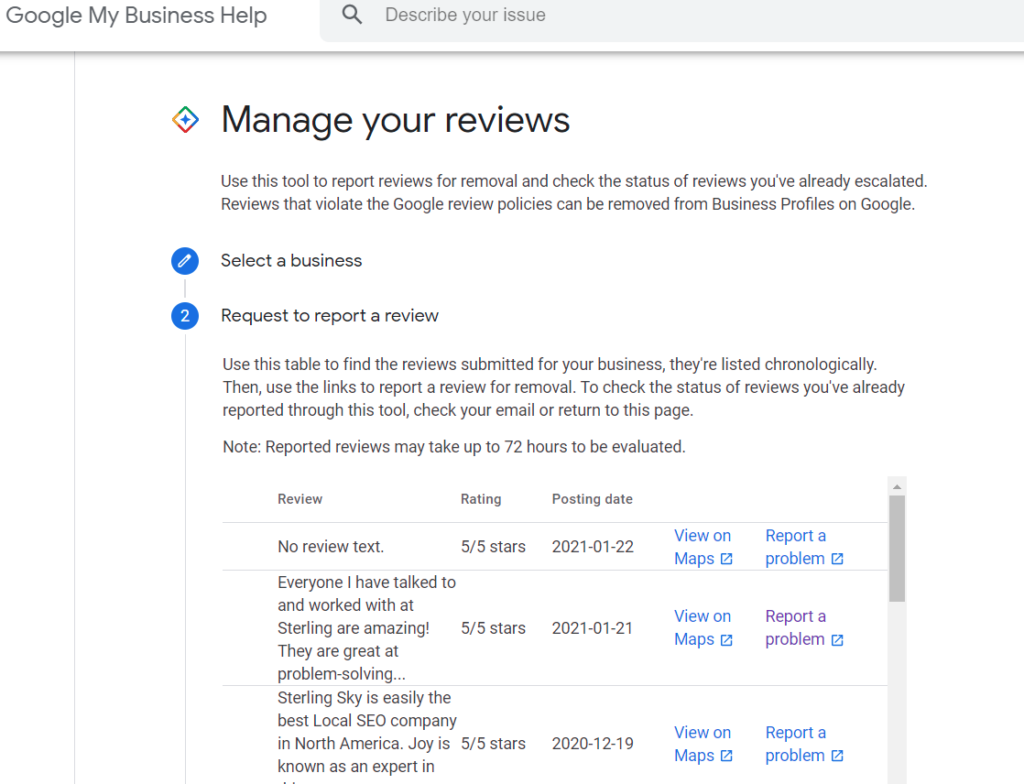
Report an existing comment


However, some netizens reported that if the account manages too many business profiles, you may see this message and be unable to use "Based on the number of Business Profiles you manage, this process is not available".
link:"Message removal request" management tool / SER report
Tutorial: Download the information of "GSC Coverage" at one time
Coverage reports on GSC have four statuses"Error", "Valid with warning", "Valid", "Excluded", each status has different types, in total29 types, and GSC will list up to 1000 URLs of each type. Normally, we can only enter each type of report and then download the URL. But if the website has many different statuses and types, downloading each one will take quite a while.
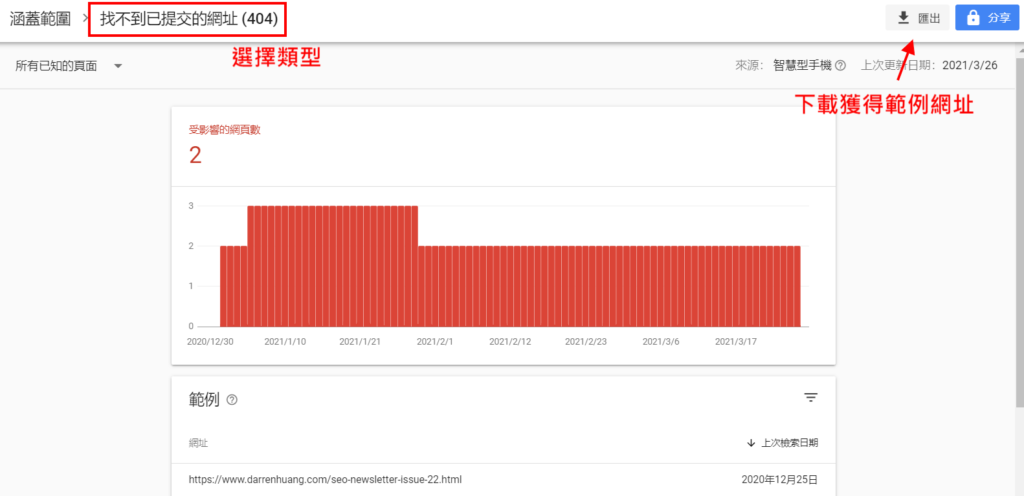
This article explains in detail step by step how to use Node.js to automate the above steps and obtain the following CSV file at once, including status, type, and sample URL, which is quite practical!!
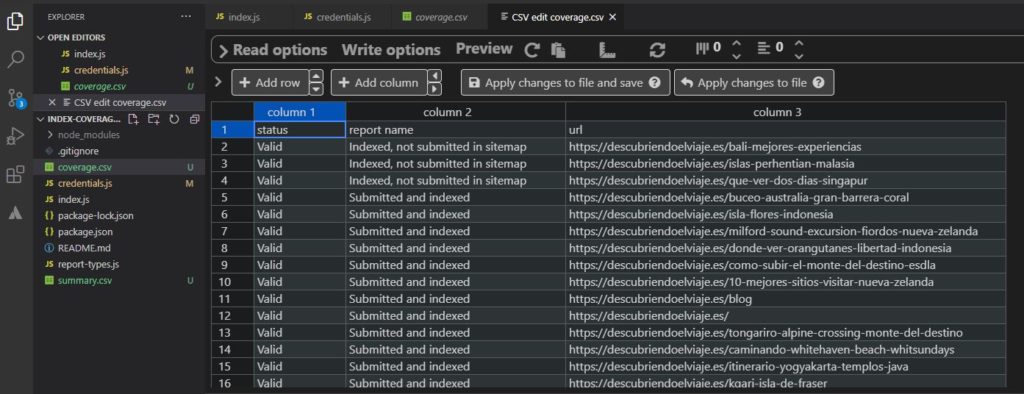
link:Original text
Google Discovery and News systems are not exactly the same
In an Office Hour, John said: A web page can appear on Google News but not on Google Explore, and vice versa.
If some pages of the same website comply with the specifications, but some pages do not, Google Discover may choose not to publish the content of the website. Generally speaking, Google's standards for exploration are higher than other places because this placement is actively pushed to users; in contrast, search or news are actively searched by users.
[Template] Automatically record web pages in Google Sheets Core Web Vitals
This template is quite simple, 1.)Obtain Google API Key, 2.) Copy thistemplate, 3.) Enter the web page you want to track, 4.) Click Save & Refresh Data in the upper right corner, and you can automatically record the data of the entered web page every day.Core experience indicators

Another function is to enter multiple domains, and the template will help you compare the overall status of these domains on a daily basis.Core Web Vitals, very suitable for comparing with competitor websites!
link:Complete Tutorial
BrightonSEO Spring briefing summary
BrightonSEO held an online conference from 3/25 to 3/26. Although I got tickets, I could only listen to a few of them due to time difference and work (replays were charged separately). Later I found this webpage and I kindly compiled most of the speakers’ briefings! There should be more than 50 to 60 of them. You are welcome to read the topics you are interested in.

link:BrightonSEO presentation compilation
Google Core Web Vitals Official Questions and Answers
Regarding the core algorithm changes that will be launched in May, Google has collected many common questions and compiled them into a Q&A collection. I have translated some concepts that I think are very important and put them below. However, I still recommend that everyone read the original post. If you have different interpretations, please leave a message for discussion!
Q: What is the score of each web page based on?
A: The 75th percentile score of all visitors to this page based on the past 28 days. In other words, if 75% of visitors have a "good" experience, the page will be classified as having a "good" performance.
Q: What if the web page is newly published?
A: We will use some mechanisms to tie similar pages together and calculate their scores. This also applies to web pages/websites with low traffic.
Q: How does CWV score affect page ranking?
A: The three scores of LCP, FID and CLS affect the ranking separately. As long as they are in the same range, the ranking impact will be the same. For example, a web page with an LCP 200ms and a web page with an LCP 1500ms both fall within the "good" range defined by LCP (<2500 ms). Therefore, the ranking impact at this point in the LCP is the same.
Q: Will CWV affect a website’s eligibility to appear on Top Stories?
A: No, the page experience will affect the ranking, but it will not affect the eligibility to appear in Top Stories. In the future, compliance with Google News content policies will be the only condition for appearing in Top Stories (not AMP; not the web experience).
Off topic: Organize and publish this Q&ACheney Tsaiis a Googler from Taiwan!
link:Official Questions and Answers
Official Video: Search and Discover Video SEO Best Practices
This video talks about some best practices for getting your videos to appear in Google Search or Discover (notYouTube SEO). Let’s introduce it at the beginningHow Google crawls/includes videos(via<video> tag、 Structured Data 、Video Sitemaps);How Google understands video content(viaText on web pages, Structured Data, Referral Links, and analysis of video sounds and images );Video appears in Google search places How、is presented, and finally give five suggestions.
- Make sure the webpage where the video is located is public
- Make good use ofVideoObjectstructured data
- provides high-quality cover images (thumbnail) and ensures they can be crawled
- Submit Submit video sitemap
- Make sure the video itself can be crawled
link:Video SEO learning resources
Official Video: How to Make Your Products Appear in Google Search
Compared with ordinary videos, this video is more basic. It has a lot of information, explaining where product information appears (general search, pictures, shopping, maps...etc); the historical evolution of Google's processing of product information; why product information is difficult to process (so it relies on structured data); and the three channels for submitting data to Google (website crawling, Feeds, Content API) and comparing their advantages and disadvantages.
I recommend friends who run e-commerce websites to watch this video carefully."Products" can appear on Google for free starting in 2020,Google is also launching more and more functions on the shopping platform, so it will be very helpful to understand in detail how Google handles product information.


link:Product structured data / Google Merchant Center Feed / Content API for Shopping
I also arranged a trip recently. As a result, after parking the car, the gear lever was stuck in P position and could not be moved. I had to ask a tow truck to tow the car away, which disrupted the entire trip. I hope everyone is safe and smooth if they go on a trip~