
Crawling is the first step toward getting a website ranked on Google. The basic idea is not especially complicated: Google has a URL, visits the webpage, discovers more URLs in the page's content, adds them to its crawl queue, and repeats the cycle.
The process sounds simple, but the web is a complicated place... (Otherwise I would not have written this much 😂)
Table of Contents
This article is a little long, but if you read patiently to the end, you will definitely learn something. Enjoy!
- Introduction
- Why You Should Understand Crawling
- It All Starts with URLs
- The Three Stages of Crawling
- What SEOs Can Optimize During Crawling
- How Can You Stop Search Engines from Crawling?
- How to Test for Search Engine Crawling Problems
- A Cautionary Tale Caused by Incorrect Crawl Settings
- Frequently Asked Questions About Search Engine Crawling
- Conclusion
Introduction
I recently gave an internal SEO training session at work called “Before Google Ranks a Page: The Lifecycle of Googlebot.” It explored the three stages a webpage must pass through before it is eligible to appear in search results: crawling, rendering, and indexing. Not long afterward, I read Mr. Harris's article “SEO Basics: Understanding Crawling and Indexing”. It inspired me to write this article and, I hope, add more depth to the Chinese-language SEO resources available online. This series will divide the concept into three articles so that everyone can gain a deeper understanding of technical SEO.
Why You Should Understand Crawling
“Crawling” is the essential first step toward getting a webpage into search results. If Google does not even know that a page exists, ranking it in search results is out of the question. When we run a website, we want Google to crawl the pages we want people to find, and we want Google not to crawl pages we do not want people to see. In addition, as a website grows and plugins are installed and removed, the site often accumulates “technical debt.” SEO's job here is to help Google crawl the website as efficiently as possible.

I don't get it. Can you explain it another way?
Imagine the entire web as an enormous library. Every webpage is a book, and search engines are the librarians, with Google being the smartest one. The librarians remember every book they have read. Whenever someone asks a question, they use their impressions to recommend books that might help. “Crawling” is the process in which a librarian comes to read your “book.” If the librarian has never seen it, the book will not be recommended, no matter how well it is written.
Why would a website have pages it does not want Google to see? Can you give an example?
For example, you generally would not want search engines to see a website that is still under development or a “mirror” site used specifically by engineers to test new features.
It All Starts with URLs
A URL is the address of a webpage. For example, https://darrenhuang.com/about-darren-huang is a URL. Here is a quiz for you. If you do not get it right, promise me you will finish this article!
Of the six URLs below, which ones are the same as the URL above in the eyes of a search engine, and which are different?
 A) https://darrenhuang.com/about-darren-huang/ (has a trailing slash)
 B) https://darrenhuang.com/about-darren-huang (starts with http instead of https)
 C) https://darrenhuang.com/ABOUT-DARREN-HUANG (uppercase)
 D) https://darrenhuang.com/about-darren-huang (does not include www)
 E) https://darrenhuang.com/about-darren-huang?utm_source=facebook (has a tracking parameter at the end)
 F) https://darrenhuang.com/about-darren-huang.html (has the .html filename at the end)
Think it over before revealing the answer!
The answer is: none of them. That's right. Technically, every example above is a different URL. Although it is uncommon, each one “could” represent a different page. During crawling, search engines therefore treat all seven as separate URLs.
The Three Stages of Crawling
Crawling is the first of the three major steps through which Google indexes a webpage. This first major step can itself be divided into three stages: “entering the Crawl Queue,” “the Crawler's visit,” and “Processing.” I will introduce them in order below.
Step 1: Entering the Crawl Queue
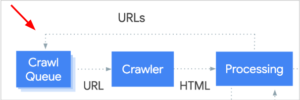
Search engines place every URL they discover into a crawl queue. URLs in the queue will then be visited by the search engine's “crawler.” Search engines primarily discover new URLs in the following three ways:
1. Links
This includes both internal and external links. A crawler can discover new URLs through links on a page and add them to the crawl queue.
2. Sitemaps
Rather than finding new URLs one link at a time and adding them to the queue, a sitemap tells a crawler which URLs exist on a website all at once, making it a more efficient method.
3. Webmaster Tools
Major search engines such as Google and Bing provide their own webmaster tools, allowing site administrators to submit URLs or sitemaps. Doing this is essentially like telling Google directly: “Hey! I have one URL—or a whole bunch of them—over here. Add it, or them, to your crawl queue!”
SEO takeaway: For a website to rank, it first has to be crawled. To be crawled, it first has to make Google aware of its existence and enter the crawl queue.
Step 2: The Crawler Visits
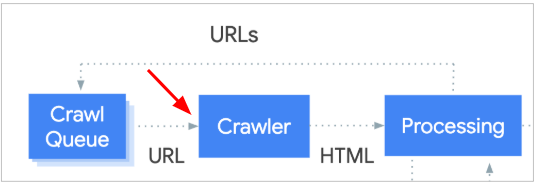
Once a search engine knows that a URL exists, it sends a “crawler” to inspect the URL and retrieve the page's content. Note that, before this point, the crawler knows only that the address exists. It has very little information about what is actually located there.
This is a conversation between the crawler—the search engine—and the server—your website. First, the crawler makes a request: “Hey, I have a URL. Can I see what is there?” It may then encounter one of the following situations:
Situation A — Server: Here you go. (Code: 2XX)
The crawler receives what it wanted and moves to the next step.
Situation B — Server: That URL is old. Try this other URL instead. (Code: 3XX)
The crawler is directed to another URL and repeats the same steps. This is known as a redirect.
Situation C — Server: No! There is a problem with that URL! (Code: 4XX)
The crawler does not receive what it wanted because the URL is incorrect. Perhaps the file does not exist on the server, or perhaps the server has determined that the crawler does not have permission to request the page.
Situation D — Server: *&#@!$ Sorry, I cannot give it to you right now. Something went wrong over here. (Code: 5XX)
The crawler does not receive what it wanted, but this time the problem is with the server, not necessarily the URL. In this situation, the crawler puts the URL back into the crawl queue in Step 1 and tries again later.
Situation E — ..... (The server never hears the crawler's request and does not respond.) (Code: none)
In this situation, the crawler's request fails to reach the server for some reason, such as a firewall. The crawler receives no response and does not even know whether anything exists at the URL.
SEO takeaway: Of the situations above, D is the most problematic because it indicates an unstable server. A user or crawler visiting the URL sees a server error. The other four situations are not absolutely good or bad. That's right: A does not necessarily mean there is no problem, while B, C, and E do not necessarily mean there is one. I will explain this in more detail below.
What do the codes in parentheses mean?
They are HTTP status codes. HTTP is the “language” that crawlers and servers use to communicate. After receiving a request, a server uses a three-digit code to tell the crawler the status of the requested URL.
- “2XX” — Codes beginning with 2 mean that the server can process the request.
- “3XX” — Codes beginning with 3 indicate a redirect.
- “4XX” — Codes beginning with 4 indicate a problem with the request, such as the common 404 error meaning that a page does not exist.
- “5XX” — Codes beginning with 5 indicate that the server encountered an error while processing the request, such as a Carrefour server becoming overloaded when everyone rushes to buy a Nintendo Switch.
Step 3: Page Processing
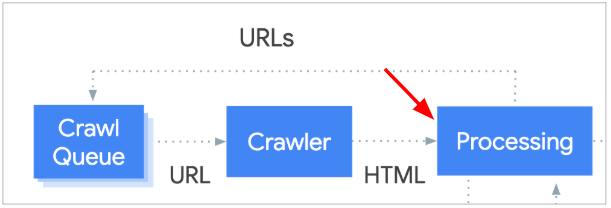
This is the final step of the crawling stage. The crawler processes the file that it successfully retrieved from the server in Situation A, finds links in its content, and places those links into the crawl queue in Step 1. The cycle then repeats.
This “processing” stage is also known as rendering. I will explain the concept in the next article, but here is a preview: “A search engine has retrieved a file from the server, but will it process the file immediately? And after processing it, is the search engine guaranteed to understand it?”
SEO takeaway: Within the scope of crawling, the most important part of this step is finding links on the webpage. For a search engine to recognize a URL as a link, it must appear in the href attribute of an <a> tag. Websites built with common site-building platforms generally do not need to worry about this because links normally use the standard HTML syntax described above.
What kinds of links can a crawler fail to see?
If you are an SEO practitioner or web engineer, pay attention to this section. JavaScript makes SEO more complicated. Some links can be clicked by ordinary users but are ignored by search engines. Here are several common examples:
<a href="/good-link">crawlable</a><a href="javascript: changePage('bad-link')">not crawlable</a><a onclick="changePage('bad-link')">not crawlable</a><span onclick="changePage('bad-link')">not crawlable</span><a href="/good-link" onclick="changePage('good-link')">crawlable</a>
What SEOs Can Optimize During Crawling
Now that we have covered how search engines crawl, the next question is what SEOs can do at this stage to keep a website “friendly” with search engines. The concept is not difficult. Our goal is to optimize the crawler's experience when it crawls our website. We can approach this from several angles.
Make sure crawlers can visit the pages they should visit
This corresponds to Step 2 in the previous section. For pages that should be visited, the communication channel between the crawler and the server must remain open. This is not hard to understand: if you want a page to appear in search results, it should not be password-protected, placed behind a firewall, or configured to prohibit search engine visits.
Make sure crawlers cannot visit pages they do not need to visit
By the same logic, we should use appropriate methods to keep crawlers away from pages that we do not want search engines to crawl. Even a search engine as large as Google does not have unlimited resources for crawling the entire web. Proactively telling crawlers which pages they do not need to crawl is a “friendly” gesture that helps them find the pages worth discovering on your site as efficiently as possible.
Make sure pages that should be crawled are easy to discover
This corresponds to Step 1 in the previous section. Pages that should be visited need to be discoverable through internal links. Imagine an important page with no links pointing to it. How would Google know it exists? Even if Google did know, it would not consider the page important.
Make sure the server gives crawlers the correct response
If something exists at a URL, say that it exists; if nothing exists there, say that it does not. With some strange server configurations, a URL may return a page saying that the webpage does not exist while simultaneously returning a successful HTTP code (2XX). In SEO, this situation is called a Soft 404 Error.
Make sure a crawler's request can reach the server easily
I mentioned redirects earlier. Redirects are not inherently wrong, but too many of them can become a problem. Here are two issues redirects can cause:
- Redirect Chain: A crawler has URL A. After visiting it, the crawler is told that the page has moved to URL B. At URL B, it is told that the page has moved to URL C, then D, E, and so on. A few redirects are fine, but after too many, the crawler may simply throw up its hands and stop.
- Redirect Loop: The server at URL A tells the crawler that the content is on page B, while the server at page B tells the crawler that the content is at URL A, creating an infinite loop.
How Can You Stop Search Engines from Crawling?
As mentioned above, we can proactively prevent search engines from visiting specific pages so that they can crawl the website more efficiently. Look at this diagram again: the crawler can be blocked at the second and third steps.
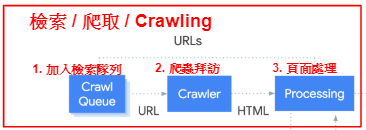
We cannot prevent a URL from entering the crawl queue in Step 1 because a crawler may discover a link to our website somewhere else.
Step 2: Apply restrictions before the crawler visits
When a crawler is about to visit a URL, tell it that it is not allowed to enter. Webmasters can set up a firewall, use password protection, or define rules for crawlers through robots.txt.
robots.txt is a text file that must be placed in the root directory. For example, this site's robots.txt is located at https://darrenhuang.com/robots.txt. In this file, we can define rules for search engine crawlers and disallow them from visiting certain files.
For example, if robots.txt contains the line Disallow: /secret-weapon, a search engine crawler that sees a URL containing /secret-weapon in its crawl queue will turn around and leave.
Because this is an introductory article, you only need to understand that the robots.txt file can restrict the paths crawlers are allowed to visit. For detailed rules and syntax, see Google's documentation. If you think you already understand robots.txt quite well, try Digital Engine's robots.txt challenge!
Step 3: Apply restrictions after the crawler visits
We can also tell a crawler, while it processes a page, “Do not place the links you see here into the crawl queue.”
Webmasters can accomplish this with a Robots Meta Tag, an X-Robots-Tag, or the link's rel="nofollow" attribute.
- Robots Meta Tag: Adding
<meta name="robots" content="nofollow" />to a website's <head> section can prevent search engines from adding any links found on that page to the crawl queue. - X-Robots-Tag: Adding
X-Robots-Tag: nofollowto the server response can prevent search engines from adding any links found on that page to the crawl queue. - The link's rel="nofollow" attribute: Adding the attribute to a link—for example,
<a href="/dont-crawl" rel="nofollow">do not crawl</a>—can prevent search engines from adding that particular link to the crawl queue.
In practice, the three methods above are rarely used for this purpose. If you do not want crawlers to visit one of your own pages, you would usually restrict it in robots.txt. nofollow is more closely related to backlinks, but because the directive was so easily misused, Google later began treating it as a hint rather than strictly obeying it.
For a deeper look at the details of this syntax, see these Google documents: “Link rel attributes” and “Robots Meta Tags and X-Robots-Tag.”
How to Test for Search Engine Crawling Problems
The fact that a webpage opens in a browser does not mean that a crawler can visit it. The easiest way to confirm whether Google's crawler can actually access a page is to use the URL Inspection tool at the top of Google Search Console. It can tell you about problems Google's crawler encountered while crawling and indexing the page.
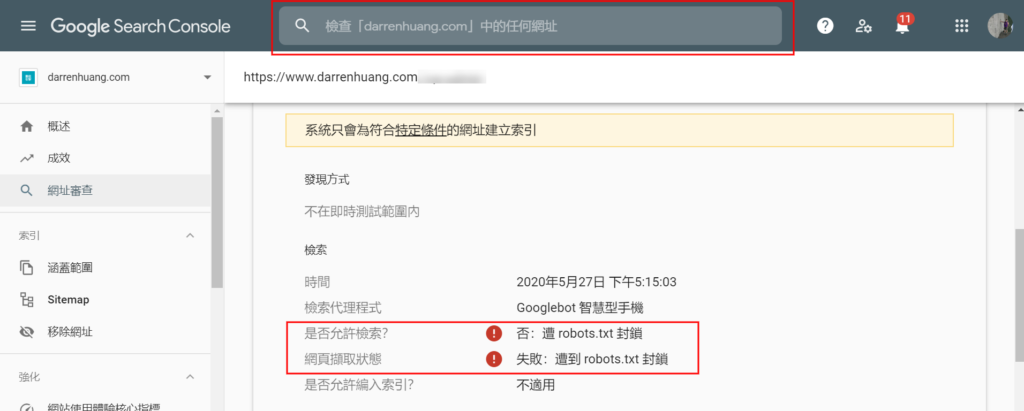
If you are troubleshooting a client's or someone else's website and do not have GSC access, you can also use another Google tool, such as the Mobile-Friendly Test. The important thing is to run the test with Google's crawler.
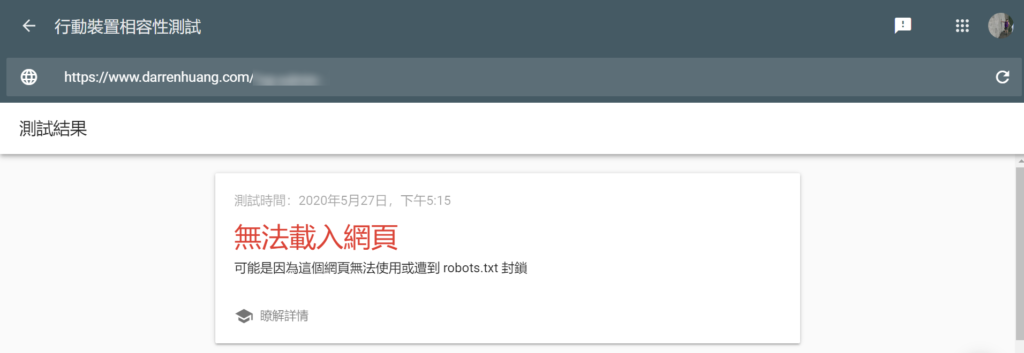
If the page reports that it cannot be loaded or crawled but robots.txt does not appear to contain a problem, a firewall or another unusual server setting may be blocking Google's crawler requests. Server-side problems are harder to diagnose from the outside, so I recommend contacting the hosting provider directly.
A Cautionary Tale Caused by Incorrect Crawl Settings
In February 2020, a story broke that invite links for private WhatsApp groups—WhatsApp being Facebook's messaging app—could be found in Google Search. The results included links to pornographic and illegal groups, and anyone could join those private groups through links in the search results (Daily Headlines report).
Post on Twitter/X
View the original post on Twitter/X
This unfortunate situation occurred because WhatsApp had not blocked crawlers during crawling or prevented search engines from indexing the pages during indexing, which I will cover in the next chapter. In a crawler's eyes, a private-group invitation link is still just a URL. It can be placed in the crawl queue, visited by a crawler, and of course potentially indexed after processing.

Frequently Asked Questions About Search Engine Crawling
That concludes the main explanation of crawling. So far, we have learned how search engines crawl webpages, why crawling matters, how SEOs can optimize a crawler's experience, and more. This section answers some common questions.
I only have a simple website. Do I really need to understand this much?
First, thank you for reading this far XD. As an SEO, I would love to tell you that crawling is incredibly important and that terrible things will happen if you do not optimize it. In reality, if your website is just a simple blog or company site, there is a good chance you do not need to worry about how search engines work behind the scenes.
As mentioned above, the web is enormous, and crawlers do not spend unlimited resources on any one website. But search engines such as Google are no slouches. They have their own systems for optimizing crawler efficiency—which links to crawl, which not to crawl, how frequently to crawl them, and so on. These are generally not issues that a small website needs to worry about.
Can I use robots.txt to block private pages?
Robots.txt can block search engine crawlers, but it cannot block ordinary users. Putting Disallow: /private-page.html in robots.txt will only make people curious about what embarrassing secret might be hiding at that URL. 😉
If you really need to put something private online, password protection is still the best approach!
Common crawling problems on e-commerce websites
E-commerce sites often use what is known as faceted navigation. Imagine the men's clothing category page on an e-commerce site, with a panel on the left that lets visitors filter products by “size,” “brand,” “color,” and so on. Every condition you add changes the URL, like this:
/mens-clothingMen's clothing/mens-clothing?size=XLMen's clothing in XL/mens-clothing?size=XL&brand=nikeNike men's clothing in XL/mens-clothing?size=XL&brand=nike&color=redRed Nike men's clothing in XL
The example above has only three filter criteria—size, brand, and color—but real e-commerce platforms offer many more. Imagine that every criterion has multiple options, some filters can be selected more than once or left unselected, and even the order after the ? can change—for example, ?brand=nike&size=XL vs. ?size=XL&brand=nike... You may already see where this is going. That's right: all those combinations can create an enormous number of URLs for the men's clothing category alone. To a crawler, every one of those URLs is a “separate” URL, and the content on them is not especially strong!
Do I need to submit every new article through webmaster tools so that Google knows about it and places it in the crawl queue as soon as possible?
Crawlers discover URLs in three main ways, and manual submission is only one of them. Even if you do not submit a page, Google can still find its link through the other methods. Submission can indeed get a page crawled and indexed more quickly, but it has nothing to do with rankings.
On a healthy website, Google can usually discover a webpage shortly after it is published even if you do not submit the URL, so there is no particular need to do so. If you find that new articles consistently take several days to be indexed, you can try the submission tool. More importantly, though, that pattern is a reason to check whether the website has another problem.
Does a URL's format affect search engine crawling?
No. Whether a webpage's URL is https://example.com/seo-friendly or https://example.com/?p=3828482, it is still just a URL. An ugly URL does not affect the crawler's ability to crawl it. Other debates—whether a URL ends in .html, contains Chinese characters, or uses a hyphen “-” instead of an underscore “_”—do not matter here either. A URL is a URL, and its format does not affect search engine crawling. Whether a pretty URL affects rankings is beyond the scope of this article!
Fun fact: The previous paragraph is not entirely correct. One HTTP status code is 414 URI Too Long, which means that the URL is too long for the server or crawler to process. The limit can be as high as 2,000 characters, however, so it is not something a normal website needs to worry about. (Stack Overflow discussion)
Do you still have a question or concern about “crawling” that I have not answered clearly enough? Leave a comment and let me know. I will answer it there or edit it into the FAQ section above! This article is meant for beginners, so if something is difficult to understand, that is my problem. Throw all your strange questions at me!
Conclusion
That concludes this introduction to search engine crawling. Thank you for reading all the way to the end. When I have time, I will turn the other two steps—rendering and indexing—into articles as well. “Digital Engine” is a Facebook page I run in my spare time. The image below is a bit of trivia I shared before that relates to this article's topic. I hope the joke makes sense now!
Related reading
Can search engines really see the content generated by JavaScript?
Saves a practical note on using the Search Console URL inspection tool to confirm whether JavaScript content is rendered, and links back to the basic article on search engine crawling and indexing.
Page is still not indexed after submission: check the entire site first
Starting from the case of "searched but not yet indexed", we would like to remind you that indexing problems do not necessarily only occur in a single URL, but may also be related to the quality and structure of the entire website.
Trailing slashes and duplicate content: What really needs to be unified is the entire URL signal
Organizes the differences between URL trailing slashes, HTTP/HTTPS, www and non-www versions, and explains that canonical, redirects, internal links, and sitemaps should all point to the same version.