
Google search autocomplete function (Autocomplete),claims to save users time every day, which is estimated to add up to more than 200 years!It helps users save typing time, helps Google better understand what you are looking for, and also gives SEO workers an additional channel when doing keyword research.
This article demonstrates howDownload the words predicted by automatic completion and the next layer of predicted words for each predicted word into a CSV file, which is convenient for subsequent organization. I believe it can save a lot of copying and pasting time. I also hope that everyone can gain better insights from it!
Tool usage and instructions
In order to save everyone's time, the methods and steps are listed below. If you are interested in learning more, there will be a more detailed introduction later. In addition, you are welcome to repost or use this tool as a basis for further expansion, but please name the source~
1. Open Google Colab file
Click thislink, you will see a copy of "Digital Engine - Google automatically completes keyword crawling.ipynb "" file, you can directly operate on it, or you can copy your own version like Google Doc.

2. Enter the search word to be queried
Enter the word you want to search in the red arrow in the picture below, one word at a time.

3. Execute
Click "Execution Phase" > "Execute All", or the shortcut key Ctrl (Cmd) + F9.

4. Download and generate CSV file.
Scroll down and you will see "Complete". Then go to the folder on the left navigation bar to find "output.csv" and download it.

5. Complete
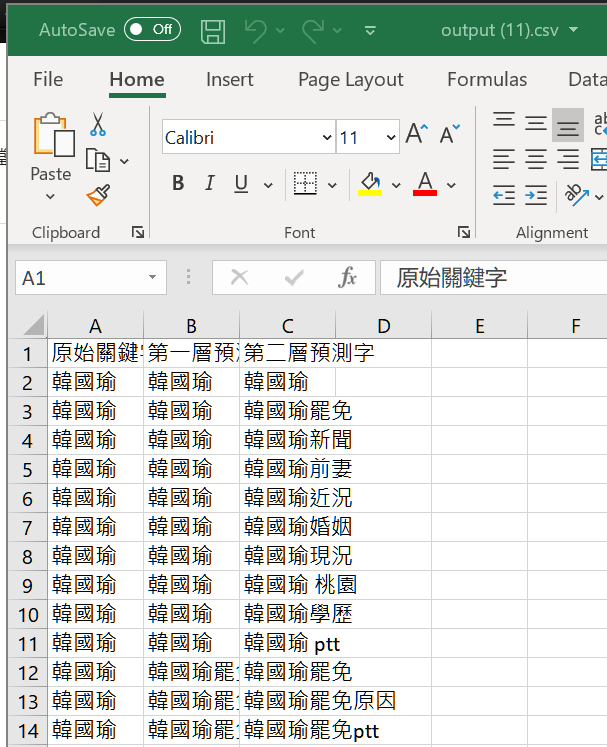
Open it in Excel and you can see the original keywords entered, and the automatically completed predicted words on the first and second levels.
This tool is free for everyone to use, but if you have other needs, such as running a large amount of keyword data, changing languages or regions, automation, or other ideas, please continue reading to learn how to modify it yourself, or write to inquire about business cooperation.
Where does the data for auto-complete keywords come from?
The autocomplete function of Google search has a little-known API. This API does not require a key or verification and is quite simple. However,This API has not been disclosed by Google. It is an unorthodox way. Announcement ofin 2015 In, Google claims that any unauthorized use may one day expire.
Despite this, this API can still be used and the data produced is quite accurate. I think you can use it as an additional tool, but don’t rely too much on it, because (1.) this API is not a method approved by Google, (2.) the tool may fail at any time (please leave a message to let us know ~)

Introduction to Autocomplete API
The structure of Google's auto-complete API is very simple. Send a GET request to the target location and you can get back a JSON file, which contains the auto-complete predicted words during search.
- API location:
http://suggestqueries.google.com/complete/search - parameters:
output= required, firefox or chromeq= Required, search word, spaces separated by plus sign (+)hl= optional, language setting (e.g. en, zh-TW, jp)gl= optional, region setting (e.g. us, tw, sg)
Example: Enter in the address barhttp://suggestqueries.google.com/complete/search?output=firefox&q=台積電&hl=zh-tw&gl=twcan see the returned file.
Google search auto-complete keyword download tool introduction
This small tool uses Python and is deployed on Google Colab for everyone to use. The installed plug-ins are several common ones.requests, json, fake_useragent, pandas, time. The language and region defaults arezh-TWandTW, this part can be modified by yourself.
This script is not difficult, mainly because the API is simple. I think it is very suitable for practicing with Python beginners. The writing part is not complicated, but in terms of application, there are a few rough ideas for your reference:
- is connected to the search volume database, and a column is added to the CSV to show the search volume of each predicted word.
- Include "related search" predictions in search results
- Retrieve the top 10 web pages in the search results and determine what proportion of web pages have the keyword in the title or description
- Better visual presentation
Everyone is welcome to discuss it together. If you succeed, you are welcome to share your code link in the message area!
References
Related reading
15 Common Technical SEO Questions: Turn Checklists into Priorities
compiles a list of technical SEO issues for 2023 and puts things like redirects, image alt text, speed, titles, internal links, and indexing back into the order of actual optimization.
Bad Cloaking Experiment: Do search engines see the same content as users?
Save an SEO experiment summary about cloaking. The focus is not on imitating black hat techniques, but on understanding the experimental variables, traffic changes, and the causal relationships that cannot be over-interpreted.
FID to INP: Historical conversion of interactive response speed metrics
Save the 2023 record Core Web Vitals indicator conversion instructions, from user interaction to the next screen drawing, to understand the experience issues that INP wants to measure.