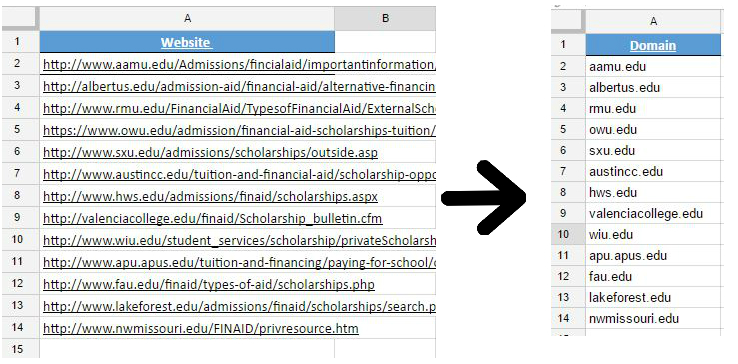
SEO work often involves a large number of external links. URLs may contain http://, www., long paths, and query strings, even though the domain name is the part we need. The =LEFT() function can clean these URLs so they are ready for the next step.
Introduction
This walkthrough uses Google Sheets. You can copy the sample from this spreadsheet into your own sheet and follow along.
Step 1: remove the prefixes
Use Find and replace three times to replace http://, https://, and www. with nothing.
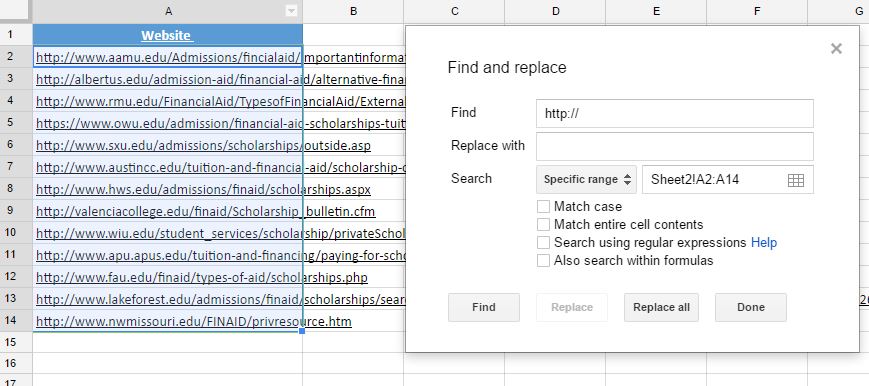
- Select the range
A2:A14. - Choose Edit → Find and replace (Ctrl+H).
- Find
http://, leave Replace empty, and choose Replace all. - Repeat for
https://andwww.(do not forget the period).
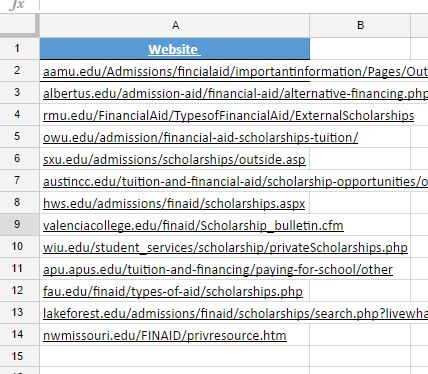
Step 2: keep the domain
In B2, enter:
=LEFT(A2,FIND("/",A2,1)-1)LEFT takes a string and a number, then keeps that many characters. For example, LEFT("D.H. Digital Marketing Notes",5) keeps the first five characters. FIND locates the first slash, and subtracting one prevents the slash from being included.
Because every domain has a different length, this formula works for both short and long domains, such as fau.edu/... and valenciacollege.edu/.... The formula finds the first slash and returns everything before it.
Breaking down FIND
"/"is the character to find.A2is the cell containing the URL.1tells Sheets to start at the first character.-1removes the slash from the final result.
FIND("/",A2,1)-1 means: find the first slash in A2 and return the position immediately before it.SEO applications
This is useful when an SEO tool expects a domain rather than a complete URL, such as when checking domain authority. It is also useful when disavowing bad backlinks at the domain level.
Conclusion
This formula may seem basic, but it is a practical way to remove the unnecessary parts from a large URL list. If you know a better spreadsheet method, feel free to share it. Thanks for reading.